Voicenotes — Warm Editorial AI
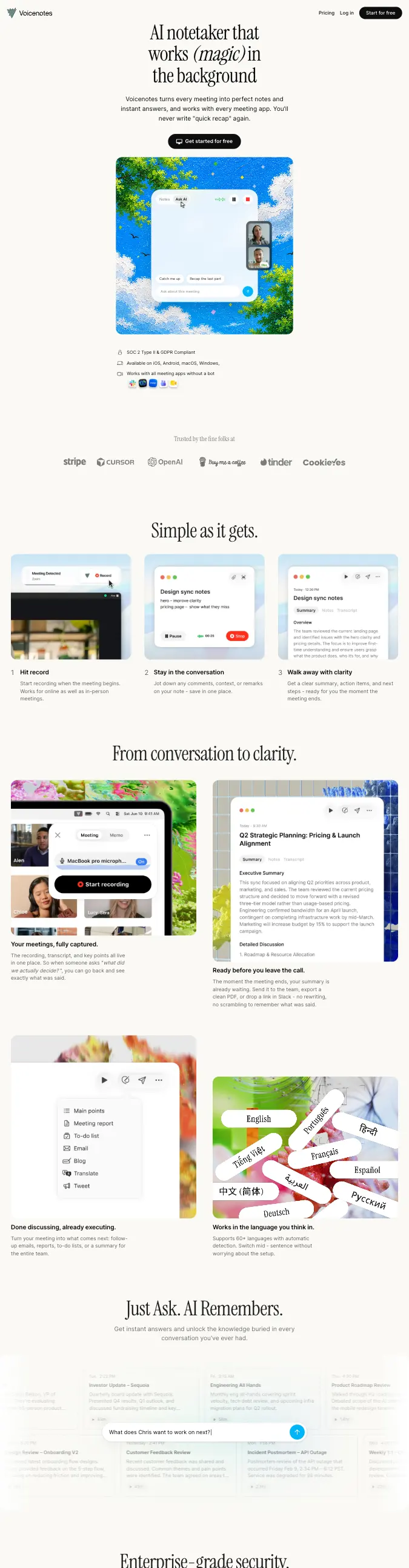
Editorial GridCream-paper AI SaaS with a serif display headline and numbered photographic screenshot grids instead of icon rows.
- Mood
- Calm, human, unusually warm for an AI product. Reads like a well-edited magazine that happens to sell software.
- Colors
- Warm cream/paper base (#F6F3EA), near-black ink text (#1B1A17), a single solid black for buttons and dividers, and vivid full-color photographic screenshots (sky blues, greens, pinks) as the only saturated color on the page.
- Type
- A refined transitional serif (like Reckless or GT Sectra) for headlines, with one italicized word per headline for emphasis; a plain geometric sans (Inter-like) for body copy, nav, and captions.
- Layout
- Centered, narrow-column hero with serif headline, one-line subhead, single black pill CTA, and a large rounded screenshot below. Body sections run in numbered 3-up grids and alternating 2-column image/caption blocks, all on generous cream whitespace with no visible section borders.
- Motion
- Understated scroll fade-ups on each screenshot block; no parallax or bounce. The screenshots themselves imply motion (recording pulses, waveform bars) rather than the page chrome.
- Texture
- Soft-shadowed rounded-corner screenshot cards in light browser/phone frames, tiny line-icon trust badges (lock, checkmark, device icons), and a muted logo strip in flat gray. No grain, no gradients, no glow.
- Imagery
- Generate: sunlit nature-photo app screenshots (sky, foliage, water) shown inside minimal browser/phone chrome, plus small trust-badge icons (lock, phone, checkmark) and monochrome partner logos. Tool: kie-ai GPT-Image or Seedream for the UI-mockup screenshots; Pexels for any raw nature backdrop photography.
- Don't
- No dark backgrounds, no neon or saturated UI chrome, no heavy borders or brutalist type, no cluttered multi-column density — the cream whitespace has to breathe.
Use in a session
voicenotes
Tell Claude: build [my thing] using swipe ref voicenotes
Full recreation prompt
Recreate a landing page in the "Voicenotes — Warm Editorial AI" style (Editorial Grid). This is a VIBE / STYLE-TRANSFER task, not a clone: apply the design DNA below to MY content and section structure, do not copy the reference's copy or exact layout.

Design DNA:
- Mood: Calm, human, unusually warm for an AI product. Reads like a well-edited magazine that happens to sell software.
- Colors: Warm cream/paper base (#F6F3EA), near-black ink text (#1B1A17), a single solid black for buttons and dividers, and vivid full-color photographic screenshots (sky blues, greens, pinks) as the only saturated color on the page.
- Typography: A refined transitional serif (like Reckless or GT Sectra) for headlines, with one italicized word per headline for emphasis; a plain geometric sans (Inter-like) for body copy, nav, and captions.
- Layout: Centered, narrow-column hero with serif headline, one-line subhead, single black pill CTA, and a large rounded screenshot below. Body sections run in numbered 3-up grids and alternating 2-column image/caption blocks, all on generous cream whitespace with no visible section borders.
- Motion: Understated scroll fade-ups on each screenshot block; no parallax or bounce. The screenshots themselves imply motion (recording pulses, waveform bars) rather than the page chrome.
- Texture: Soft-shadowed rounded-corner screenshot cards in light browser/phone frames, tiny line-icon trust badges (lock, checkmark, device icons), and a muted logo strip in flat gray. No grain, no gradients, no glow.
- Avoid: No dark backgrounds, no neon or saturated UI chrome, no heavy borders or brutalist type, no cluttered multi-column density — the cream whitespace has to breathe.

Imagery (generate real assets, do not use placeholders): Generate: sunlit nature-photo app screenshots (sky, foliage, water) shown inside minimal browser/phone chrome, plus small trust-badge icons (lock, phone, checkmark) and monochrome partner logos. Tool: kie-ai GPT-Image or Seedream for the UI-mockup screenshots; Pexels for any raw nature backdrop photography.

Reference exemplar: https://voicenotes.com. Build the page around the content I give you next, faithfully channeling this aesthetic, and generate the matching imagery described above.